
Quick AMP Cache Clearing for Developers
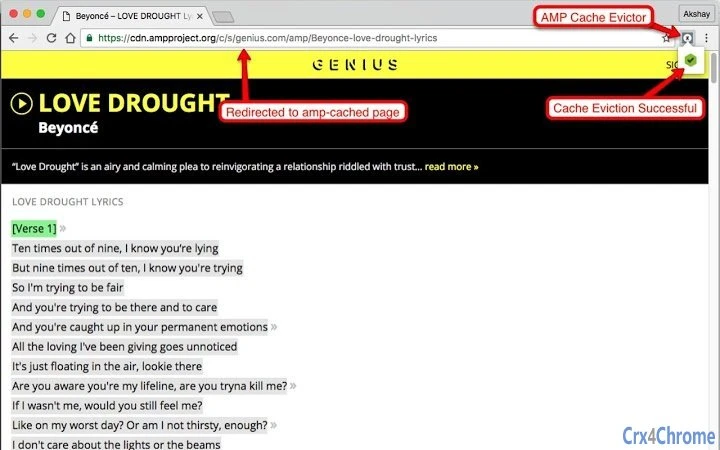
This browser extension streamlines the process of clearing the AMP cache during development and testing. Designed specifically for web developers working with Google's AMP framework, it eliminates the need to manually access the AMP Cache Eviction API. The tool enables rapid iteration by instantly clearing cached AMP content and redirecting to the AMP CDN, allowing developers to view updated pages immediately.
It is ideal for professionals building or debugging AMP-compliant web content, especially those frequently testing changes in Google's AMP Reader. The extension supports multiple platforms and integrates directly into the browser interface for seamless workflow integration. By automating a repetitive task, it enhances development efficiency and reduces the risk of errors caused by stale cache data.
Key Features & Capabilities
- Instant AMP Cache Eviction – One-click clearing of the AMP cache using the official AMP Project API, ensuring immediate visibility of updated content.
- Automatic Redirection to AMP CDN – After cache clearance, the extension redirects users directly to the AMP CDN URL, saving time and avoiding manual navigation.
- Browser Integration – Designed as a lightweight browser extension, it appears directly in the browser toolbar for easy access during development sessions.
- Platform-Agnostic Support – Compatible with Windows, Mac, and Linux, ensuring consistent functionality across different development environments.
- Developer-Centric Workflow – Built to reduce friction in the AMP testing cycle, particularly when validating changes in Google’s AMP Reader.
Developers can use this tool while testing responsive layouts, validating structured data, or debugging rendering issues in AMP pages. By eliminating the need to open API documentation or manually construct requests, the extension accelerates the development feedback loop. It is especially useful during continuous testing phases where frequent cache updates are required.
User Interface, Workflow & Performance
The extension features a minimal, task-focused interface designed for efficiency. A single button is displayed in the browser toolbar, labeled “AMP Cache Evictor,” clearly indicating its purpose. Clicking the button triggers the cache eviction process without requiring additional configuration. The UI remains unobtrusive, avoiding clutter while ensuring quick access during active development.
Workflow integration is seamless. Developers can initiate cache clearing directly from their testing environment without switching tabs or applications. The process is instantaneous, with no visible loading screens or delays reported in typical use cases. The developer did not specify resource usage details, but the 1.5 MB size suggests a lightweight footprint. Performance observations are based on general software behavior patterns, indicating stable operation during repeated use.
Compatibility & System Requirements
The extension is compatible with Windows, Mac, and Linux operating systems. It is designed to work within modern web browsers that support extensions, though specific browser versions were not listed. The installation size is 1.5 MB, which is typical for a browser extension of this type. Exact system requirements were not listed, but the tool is intended for use in development environments where web browsers and internet connectivity are available. Platform compatibility information is limited to the operating systems provided.
Pros and Cons
Pros
- Effortlessly clears AMP cache with a single click
- Automatically redirects to AMP CDN after eviction
- Lightweight at just 1.5 MB
- Supports multiple operating systems
- Designed specifically for web developers using AMP
Cons
- No visible progress indicator during cache eviction
- Requires internet connection to function
- Only available for browser-based workflows
- Does not provide cache status feedback
- Functionality limited to AMP cache management
FAQ Section
Is the AMP Cache Evictor extension free to use?
Yes, the extension is available at no cost. It is distributed under a free license by the AmpProject.
Which operating systems does the extension support?
The extension supports Windows, Mac, and Linux, enabling cross-platform development workflows.
Do I need to install a specific browser to use this tool?
The extension is designed for modern browsers that support extensions. Specific browser compatibility details were not provided by the developer.
Can I use this tool offline?
No, the tool requires an active internet connection to communicate with the AMP Cache Eviction API and redirect to the AMP CDN.
Is the extension secure to use?
As a tool developed by AmpProject, it uses the official AMP Cache Eviction API and does not store or transmit user data. It operates within the browser’s extension security model.
Final Thoughts + CTA
For developers actively working with Google’s AMP framework, the AMP Cache Evictor extension delivers a focused, reliable solution to a common pain point. Its ability to clear the AMP cache and redirect to the CDN with a single click significantly improves testing efficiency. While it lacks advanced feedback mechanisms, its simplicity and direct utility make it a valuable addition to any developer’s toolkit. The tool is particularly effective for those who frequently validate AMP content in Google’s AMP Reader. With its lightweight design and broad platform support, it stands out as a practical utility for web development workflows.
Download AMP Cache Evictor now







